Dear students,
I hope you had an amazing summer. Welcome and welcome back. The Advanced Technology team has been busy working on several upgrades and improvements for you in addition to some changes. I would like to share the details as we begin this fall semester and new academic year.
Getting started
First, please visit this web page for some of the important items you need to get started with our resources: Getting started
An important note: Our offices will be closed on Monday, September 1st for Labor Day. Marquis will be working on Saturday from 10AM – 3PM. Any support tickets that come in after that will not be addressed until Tuesday morning.
Adobe
I sent an update earlier in the summer about the Adobe changes happening at the university level. In case you missed that email, I wanted to reiterate and reassure you that there will be no changes to how Adobe is offered here. The school will continue to cover the cost of Adobe licenses for all of our students.
Print pricing update
We periodically need to adjust our pricing structure to account for market conditions. Here are the changes to print pricing that will go into effect on August 28th:
| Printer | Old Price | New Price |
|---|---|---|
| FineArt-24 | $3.50 | $3.25 |
| HeavyBond-42 | $4.75 | $4.00 |
| HeavyBond-60 | $6.00 | $5.00 |
| Draft-36 | $1.75 | $2.25 |
| Photocopiers BW (single-sided) | 8.5x11 - $0.10/Side, 11x17 - $0.15/Side | 8.5x11 - $0.08/Side, 11x17 - $0.12/Side |
| Photocopiers BW (double-sided) | 8.5x11 - $0.08/Side, 11x17 - $0.13/Side | 8.5x11 - $0.06/Side, 11x17 - $0.10/Side |
| Photocopiers Color (single-sided) | 8.5x11 - $0.20/Side, 11x17 - $0.40/Side | 8.5x11 - $0.15/Side, 11x17 - $0.30/Side |
| Photocopiers Color (double-sided) | 8.5x11 - $0.18/Side, 11x17 - $0.38/Side | 8.5x11 - $0.13/Side, 11x17 - $0.28/Side |
The most up to date pricing information can always be found here
Equipment reservations
This year we are making some changes to how equipment reservations work.
We are requiring everyone to complete a policy waiver in Ruby along with our other requirements. We want to make sure everyone is aware of our policies before checking out equipment.
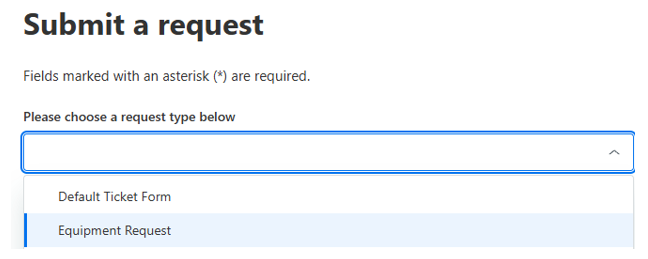
- A support ticket is required for all reservations. Please use the ‘Equipment Request’ form.
- Equipment can only be checked in or out when a staff member is present.
- Consecutive renewals are not permitted in order to maintain fairness.
- Reservations and checkouts are only available during staff hours in Room 602:
| Days | Time |
|---|---|
| Mon, Wed, Fri | 3:00 PM – 5:00 PM |
| Mon–Fri | 5:00 PM – 9:00 PM |
| Saturday | 10:00 AM – 3:00 PM |
3D printing
- Prusa Core One fleet

We have replaced our main PLA 3d printing fleet with 24 Prusa Core One devices. These new 3D printers will provide better quality at faster speeds. In addition, we expect to see even better reliability than previous models.
- Elegoo resin printer
We have retired our AnyCubic 3D printers in favor of a new model, the Elegoo Saturn which is also faster and provides significantly higher quality and detail.
- SimplyPrint slicing
While we continue to provide desktop slicing for 3D printing, SimplyPrint now provides slicing in the cloud as the more convenient solution.
Artificial Intelligence
Minerva up front
Our team continues to develop our support chatbot, Minerva. We would like to encourage you to ask Minerva questions that might not require a human response as a form of self-service. Just remember, we have an ‘I Want a Human’ button that will quickly check you out of the chatbot and directly into a Zendesk ticket with your conversation.

Unifying Minerva with Zendesk and new Forms
There is a new landing page for Zendesk support which contains a dropdown for all of our new forms. If you select ‘Default Ticket Form’, you will be greeted with an option to use Minerva or to fill out a ticket.
In addition, you can choose other forms such as Vulcan Request, Equipment Reservation, etc.
Vulcan requests expanded
Vulcan is our in-house custom chatbot system. With Vulcan, we have the ability to create instances for different individuals or groups of people.
Previously, Vulcan was reserved for faculty use only, but we have now opened it up to our entire community by request.
This semester will be an opportunity for us to determine new demand, and we may find an upper limit to what we can realistically provide, but we will communicate to you if we do.
Photography lab
Our Photography Lab has been updated with several new features:
Three independent studio spaces A, B, and C (up from two)
New digital backdrop systems in each studio with remote
Ability to control lighting with mobile app
Tripods, step stools, turn tables (on order) in every studio
New height adjustable tables
Daylight and environmental analysis
I would like to thank Aysel Aziz for all her hard work and efforts on both of the following items.
Heliodon

In the small alcove in the Photography Lab is a new custom designed and fabricated Heliodon which is an analog daylight simulation device that can simulate sun and shadow patterns at various locations and times across the surface of the Earth.
- This is an expensive and specialized tool that requires some training before using it. Any student interested should plan to attend workshops (information forthcoming) that will be offered this semester.
Climate Studio
Environmental performance plug-in for Rhino that provides fast, accurate analysis of daylighting, electric lighting, energy use, visual comfort, thermal comfort, and related performance metrics.
- Installed on all student-facing workstations.
New LCD screens
All of our 85” screens on our mobile carts have been replaced with newer models which also include a new Logitech Rally Bar all-in-one camera/mic/speaker array for better video conferencing capabilities.
With these new screens:
- If any screen needs to be moved, they need to be moved with care, by their handles, with a minimum of two people.
- The screens in the 7th floor back pit are NOT permitted to be moved out of that pit under any circumstances.
- Screens are not permitted to be moved up or down stairs
Advanced computer lab workstations (sub-basement)
Our workstations in this lab have been upgraded to a slightly higher spec than studio workstations. With slightly newer processors, storage, and GPU.
This upgrade offers you another option if you need a little more horsepower for your projects and work.
Laser cutter upgrades
A few years ago, we switched each “A” (left) studio laser from a 4” lens to a 2” lens with air assist and flow through bed. This year, we have switched all laser cutters to include the “A” spec. We also swapped out all laser tubes with new ones.
Thank you
I would like to thank our entire team for all their hard work: Aaron Vega Ortega our New Haven Promise intern, Nils Carlson, David Liston, Rob Liston, Marquis Lockhart, Jorge Quintana, Jason Shuff, and Trevor Williams. The work we do is always a true team effort.
We look forward to meeting you and working with you!
Thanks,
Vin
Vincent Guerrero
Chief Technology Officer
Yale School of Architecture

Art and Architecture Building, Yale University, New Haven, Connecticut. Perspective Rendering of Early Scheme.
© The Estate of Paul Rudolph, The Paul Rudolph Institute for Modern Architecture